
Facebook Marketplace Scams of 2025- With Examples

Author: Adam Collins
Ah, Facebook Marketplace. The digital flea market where you can find everything from vintage furniture to slightly used air fryers. It’s a treasure trove of deals, but let’s be real—it’s also a breeding ground for scammers.
And in 2025, these scammers have leveled up. They’re slicker, sneakier, and more creative than ever.
But don’t worry, I’ve got your back. Let’s dive into the wild world of Facebook Marketplace scams, how to spot them, and what to do if you get caught in one. Spoiler: It involves less crying and more action.
How to Tell if a Buyer is Scamming You on Facebook Marketplace
Picture this: You’ve just listed your old couch for sale, and within minutes, someone messages you, “I’ll take it! Can you hold it for me?” Exciting, right? But hold up—before you start planning how to spend that cash, let’s make sure this buyer isn’t pulling a fast one on you.
Scammers love to play the “too good to be true” card. They’ll send copy-paste messages like, “Is this available?” (Duh, it’s listed, isn’t it?) and then hit you with a sob story or a weird request.
For example, they might insist on using their courier or ask you to meet them in a shady location. Or, they’ll send you a fake payment confirmation and pressure you to hand over the item before the “payment clears.”
Real-Life Example:
Take Hella Bertrand, for example. She listed a coat for $100 on Facebook Marketplace, and within hours, a buyer named “Addison” messaged her, eager to make the purchase. Addison claimed he was out of town but offered to pay via e-transfer right away. Sounds convenient, right? Well, here’s where it gets sketchy.
Addison sent Hella an Interac link to complete the payment.

But when Hella tried to process it, the transfer didn’t go through. Addison brushed it off, saying, “Oh, it must be the wrong account. Let me try again.” Hella, feeling a little uneasy but not wanting to lose the sale, gave him the benefit of the doubt. Big mistake.
The next morning, Hella woke up to a nasty surprise. Instead of finding $100 in her account, she discovered $700 had been withdrawn. Yep, you read that right. The shady Interac link Addison sent wasn’t to deposit money—it was to steal it. And to make matters worse, when Hella went back to check their conversation, Addison had deleted all his messages, leaving Hella with nothing but regret and a lighter wallet.

Red Flags to Watch For:
- Buyers who refuse to meet in person or inspect the item.
- Overly complicated payment methods (e.g., “I’ll send you a check for $500 and you can give me back the change.”).
- Pressure to act quickly or bypass Facebook’s secure payment system.
Pro Tip: Always check the buyer’s profile. If it was created last week and has zero friends or reviews, run. Fast.
Red Flags for Facebook Marketplace Sellers
Now, let’s flip the script. If you’re the buyer, you need to be just as cautious. Scammers aren’t just targeting sellers—they’re coming for your wallet too.
One of the most common scams on Facebook Marketplace involves sellers listing items at prices that scream, “This is too good to be true!” Think: a brand-new PS5 for $50. (Yes, really.) When you message them, they’ll hit you with a sense of urgency, saying things like, “This is in super high demand—I’ve got three other buyers ready to pay right now!” They’ll pressure you to send payment upfront to “secure” the item.
But here’s the spoiler: You’ll never see that PS5. Or your $50. Once they have your money, they’ll ghost you faster than you can say, “I should’ve known better.” And if you try to follow up? Crickets.
It’s a classic bait-and-switch, and it works because, let’s face it, who doesn’t love a good deal? But remember: If it seems too good to be true, it almost always is.
Real-Life Example:
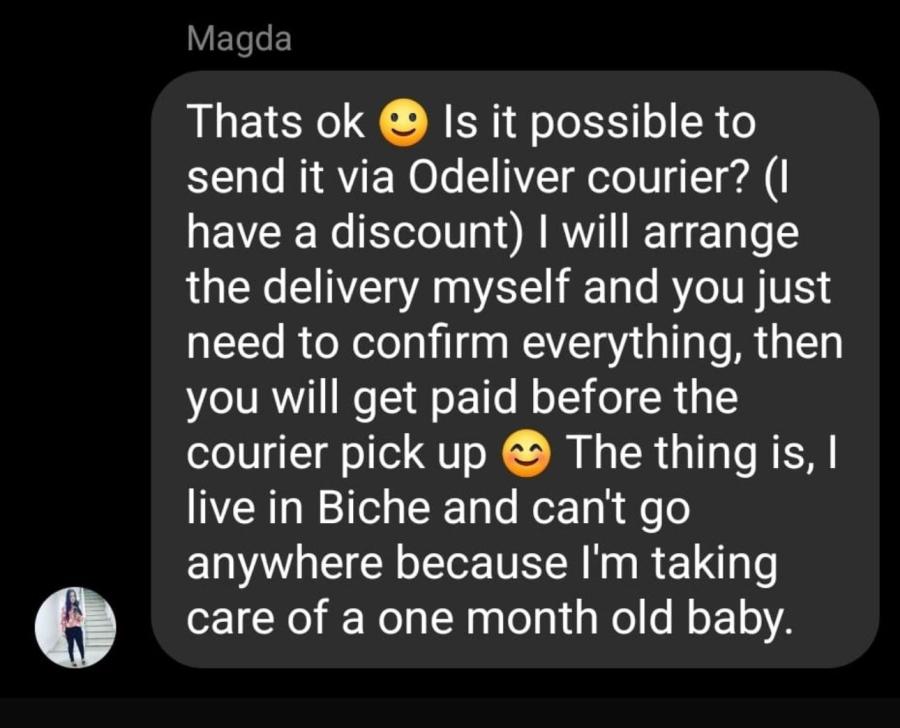
Another scam targets small businesses and sellers. Scammers send generic messages like, “I’ll buy it! Can you use my courier?” They’ll provide fake bank transactions, claiming the payment is “pending,” and ask for cash on delivery.

Source: LinkedIn
But when the courier shows up, they vanish—leaving you without your item or your money. In some cases, delivery drivers have even been robbed. Talk about adding insult to injury.
Red Flags to Watch For:
- Sellers who refuse to provide additional photos or details.
- Listings with stock images instead of real photos.
- Requests for payment outside of Facebook Marketplace (e.g., Venmo, Cash App, or wire transfers).
Pro Tip: If the deal feels off, it probably is. Trust your gut and walk away.
Can You Get Your Money Back if You Get Scammed?
Okay, let’s say the worst happens: You’ve been scammed. Maybe you sent money for a “brand new iPhone” that turned out to be a brick. Or maybe you handed over your item, only to realize the payment was fake. What now?
First, don’t panic. There are steps you can take to try to recover your money. Start by reporting the scam to Facebook. While they’re not exactly known for their lightning-fast customer service, it’s worth a shot.
Next, contact your bank or payment provider. If you used a credit card or PayPal, you might be able to dispute the charge and get a refund.
Real-Life Example:
One sneaky scam involves fraudsters posing as buyers who say, “I’ll pay now and pick up later.” They send an Interac notice that prompts a text authorizing the deposit into your account. But instead of sending money, the text authorizes them to withdraw money from your account. Sneaky, right? If this happens, contact your bank immediately to reverse the transaction.
Pro Tip: Always use secure payment methods like PayPal Goods and Services, which offer buyer protection. And never, ever, send money to someone you don’t trust.
Is It Safe to Give Out Your Address on Facebook Marketplace?
Let’s talk about safety for a second. Giving out your address to a stranger on the internet? Yeah, that’s about as safe as juggling flaming swords. While most buyers and sellers are legit, there’s always a risk of running into someone with bad intentions.
Real-Life Example:
Some scammers have used sellers’ addresses to commit further fraud or even rob delivery drivers. Others have shown up unannounced, demanding items or causing trouble. One seller reported receiving threats after sharing their address with a scammer. Not exactly the kind of excitement you signed up for, right?
Safer Alternatives:
- Meet in a public place, like a coffee shop or police station parking lot.
- Use Facebook’s suggested meetup spots, which are often monitored for safety.
- If you must share your address, wait until the last minute and only provide it to verified buyers.
Pro Tip: If someone insists on coming to your house, trust your instincts and say no. Your safety is worth more than a sale.
How to Avoid Facebook Marketplace Scams in 2025
So, how do you navigate this minefield of scams? Here are a few golden rules:
- Trust Your Gut: If something feels off, it probably is.
- Do Your Homework: Check the buyer/seller’s profile, reviews, and activity.
- Use Secure Payment Methods: Stick to Facebook’s built-in tools or PayPal Goods and Services.
- Meet in Public: Always choose a safe, neutral location for exchanges.
- Stay Informed: Scammers are always coming up with new tricks, so keep up with the latest scam trends.
Bottom Line: Watch Out for Facebook Marketplace Scams
Facebook Marketplace is a great place to score deals and declutter your life, but it’s also a playground for scammers. By staying vigilant, trusting your instincts, and following these tips, you can avoid becoming their next victim. And if you do get scammed? Don’t beat yourself up—just take action, report it, and learn from the experience.
Remember, the best defense against scams is a healthy dose of skepticism and a little common sense. Now go forth and sell that old couch (safely, of course). You’ve got this!
Report a Scam!

Have you fallen for a hoax, bought a fake product? Report the site and warn others!
Scam Categories
Help & Info
Top Safety Picks
Your Go-To Tools for Online SafetyDisclaimer: Some of the links here are affiliate links. If you click them and make a purchase, we may earn a commission at no extra cost to you.
- ScamAdviser App - iOS : Your personal scam detector, on the go! Check website safety, report scams, and get instant alerts. Available on iOS
- ScamAdviser App - Android : Your personal scam detector, on the go! Check website safety, report scams, and get instant alerts. Available on Android.
- NordVPN : NordVPN keeps your connection private and secure whether you are at home, traveling, or streaming from another country. It protects your data, blocks unwanted ads and trackers, and helps you access your paid subscriptions anywhere. Try it Today!
- Incogni : Incogni automatically removes your personal data from data brokers that trade in personal information online, helping reduce scam and identity theft risks without the hassle of manual opt-outs. Reclaim your privacy now!
Popular Stories
In a nutshell: A good VPN protects your privacy with strong encryption, a strict no-logs policy, and fast protocols like WireGuard. The best VPNs also offer wide server coverage, leak protection, and easy-to-use apps for all devices. For 2025, the top providers are NordVPN, ExpressVPN, Surfshark, Proton VPN, Private Internet Access, CyberGhost, and Mullvad—each excelling in speed, security, or value. In an age where every click is tracked, a Virtual Private Network (VPN) is no longer just a luxury—it's an essential tool for digital privacy and security. A VPN works by creating a secure, encrypted tunnel between your device and the internet, masking your real IP address and protecting your sensitive data from prying eyes. But with hundreds of providers out there, how do you sort the secure from the suspect? This guide breaks down the non-negotiable features of a quality VPN and highlights the 7 top-rated services for 2025. What to Look for in a Good VPN: The 4 Non-Negotiable Pillars 1. Ironclad Security Features Strong Encryption: AES-256, the gold standard. Secure Protocols: OpenVPN, WireGuard, NordLynx, Lightway. Avoid PPTP. Kill Switch: Ensures no accidental IP leaks. Leak Protection: Covers DNS, IPv6, and WebRTC. 2. Verified Privacy Practices No-Logs Policy: No activity or metadata tracking. Independent Audits: Verification by third parties. Safe Jurisdiction: Prefer countries outside the 5/9/14 Eyes alliances. 3. High-Speed Performance Fast Protocols: WireGuard and equivalents. Large Server Network: Less crowding, more reliable speeds. 4. Essential Usability Features Multi-Device Apps: Windows, Mac, iOS, Android, routers. Simultaneous Connections: One account, many devices. Unblocking Power: Netflix, Hulu, BBC
How to Protect Yourself and Your Family After a Data Breach When Your Data Falls Into the Wrong Hands Just received that terrifying notification? Or perhaps you've noticed suspicious activity in your accounts? Take a deep breath. A data breach, the unauthorized access or exposure of sensitive, protected, or confidential data, is a deeply unsettling event. It can plunge you into a world of worry, bringing risks from financial losses and identity theft to significant emotional distress and reputational damage. The numbers don't lie: according to a 2024 report, the number of data breach victim notices has grown by a staggering 211% year-over-year. This isn't just a distant threat; it's a stark reality many individuals face. This year alone, we've seen major organizations like Adidas and Qantas grapple with high-profile data breaches, affecting countless customers. This underscores a critical truth: nobody is untouchable. Subsequently, strategic action is the only way to minimize the risk and protect your future. This guide is your emergency action plan, designed to walk you through every crucial step—from confirming the breach to fortifying your digital life for the long term. Part 1: Confirming the Breach and Understanding the Damage The very first step is to answer the question definitively: Was my data compromised, and if so, how badly? Start with the basics: Check Official NotificationsReputable companies are legally obligated to inform you if your data was part of a breach. Look for official emails, letters, or public announcements. Check Verified Breach DatabasesPlatforms like HaveIBeenPwned help you see if