
Fake Jobs, Phishing Emails, and Fear Tactics – This Week’s Top Emotional Scams
Author: Adam Collins
Scams these days aren’t just sloppy typos and Nigerian princes. They’ve evolved. Now they wear a suit, quote philanthropy, impersonate official agencies, and offer you dream jobs from the comfort of your bed. How thoughtful.
This week, we’re diving into four sneaky scams making the rounds — from fake remote gigs to impersonations of billionaires and gas companies. If it sounds too good (or too terrifying) to be true, it probably deserves a hard side-eye.
Let’s break it down.
1. “Online E-commerce Assistant” – The Remote Job That’ll Leave You Broke
The Setup:
You stumble across a remote job listing that seems perfect. Work from home, earn $30–$80 per hour, no experience needed. Even training is included! The role? An Online E-commerce Assistant for the prestigious-sounding Alliance Recruitment Agency.
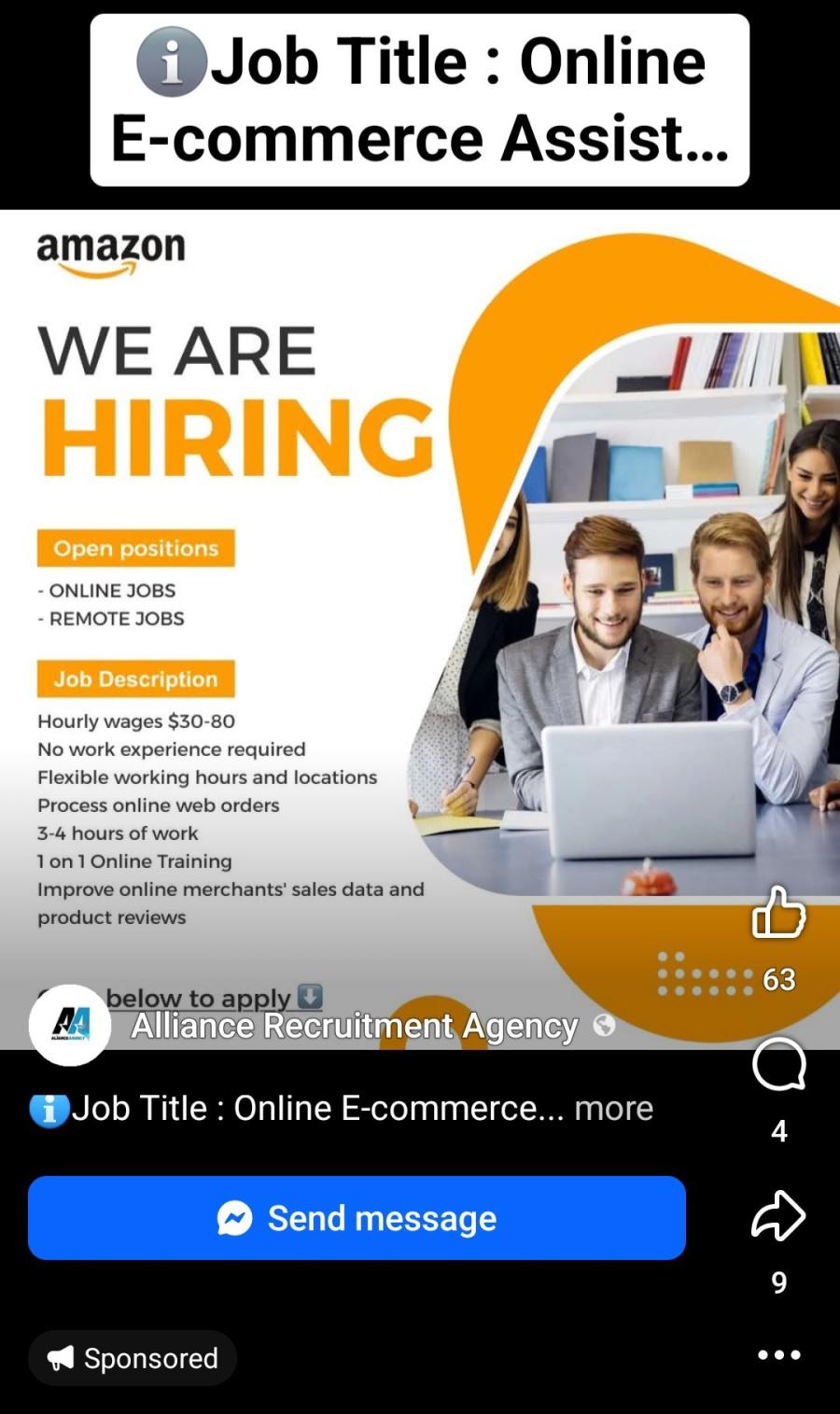
The job seems legit… until you’re asked to pay a “training fee,” provide your personal information, or start handling money or parcels.
What’s Sketchy:
- No company pays that much for 3 hours a day with zero experience.
- The company may be real, but the job listing isn’t.
- Real employers don’t ask for money up front.
Pro Tips:
- Always research the company and verify job listings on their official site.
- Be suspicious of high pay, low effort, and “no experience needed” jobs.
- Never pay to get hired. That’s not a job — that’s a scam.
2. DMV Final Notice – Fear Tactic in Overdrive
The Setup:
You get a terrifying message: you’ve racked up a fine from the DMV. You ignored previous warnings, and this is your final notice. Pay now, or face legal action, a suspended license, or something equally dreadful.
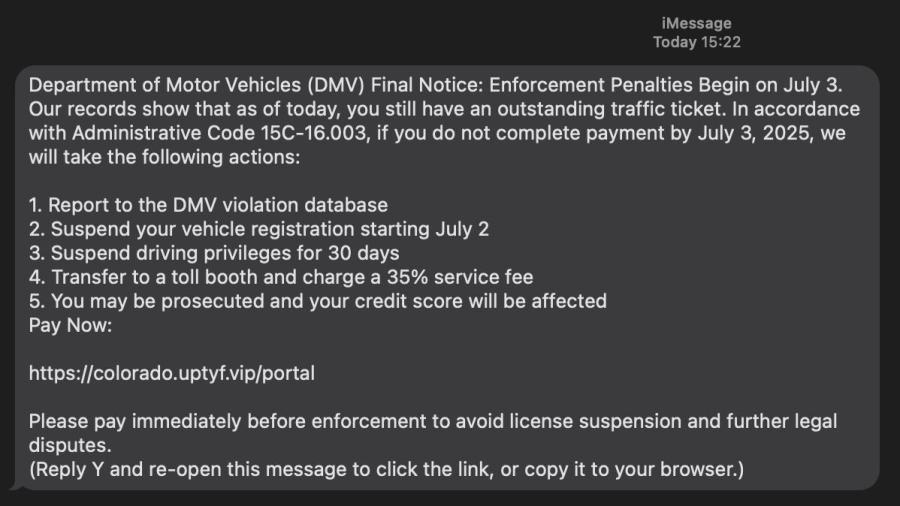
Click the link, and you're taken to a payment portal that resembles the DMV... until it swipes your card information and vanishes into cyberspace.
What’s Sketchy:
- DMVs don't usually text or email fines with links, and they certainly don’t sound like a movie villain.
- The link? Suspiciously short or misspelled.
- High-pressure language like “FINAL NOTICE” and “ACT NOW” = classic scam playbook.
Pro Tips:
- Visit the actual DMV website or call them directly to check fines.
- Never click on payment links from unexpected texts or emails.
- Government agencies don’t threaten payment in all caps.
3. “Congratulations! I’m MacKenzie Scott” – The Philanthropist with a Phishing Problem
The Setup:
You receive an elegant (ish) email from MacKenzie Scott, who — bless her giving heart — has randomly selected you to receive USD 1.5 million. Just confirm your email address so she can share the wealth.
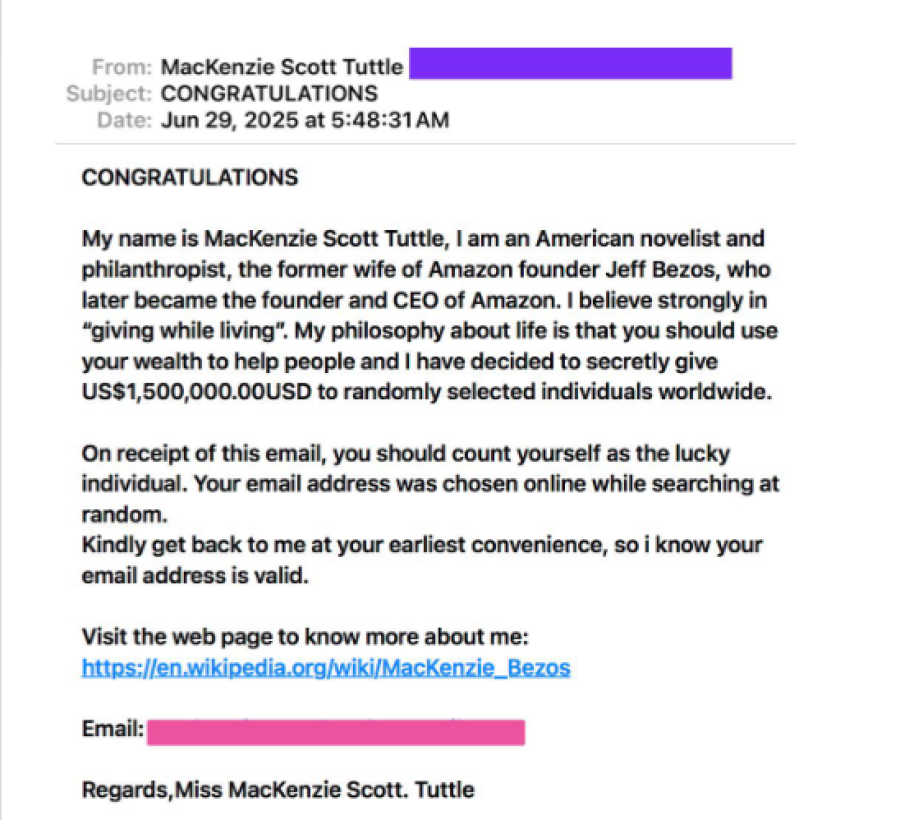
The email includes heartwarming sentiments like “giving while living” and details about her ex-husband (yep, Bezos). All very noble — except for one detail: it’s fake.
What’s Sketchy:
- MacKenzie Scott does give money… but not via email lottery.
- Bad grammar, excessive zeros, and awkward capitalizations are dead giveaways.
- You weren’t "randomly selected." Your email was scraped.
Pro Tips:
- Delete any “you’ve won money” emails unless you entered a contest — and even then, triple-check.
- Never share personal or banking info with strangers (even generous billionaires).
- Report phishing emails to your provider or phishing-reporting services.
4. Impersonating British Gas – A Chilly Kind of Scam
The Setup:
An email lands in your inbox claiming to be from British Gas. It says your direct debit failed, and you need to pay ASAP to avoid disconnection. The email even addresses you — well, your email address — and kindly provides a handy link.
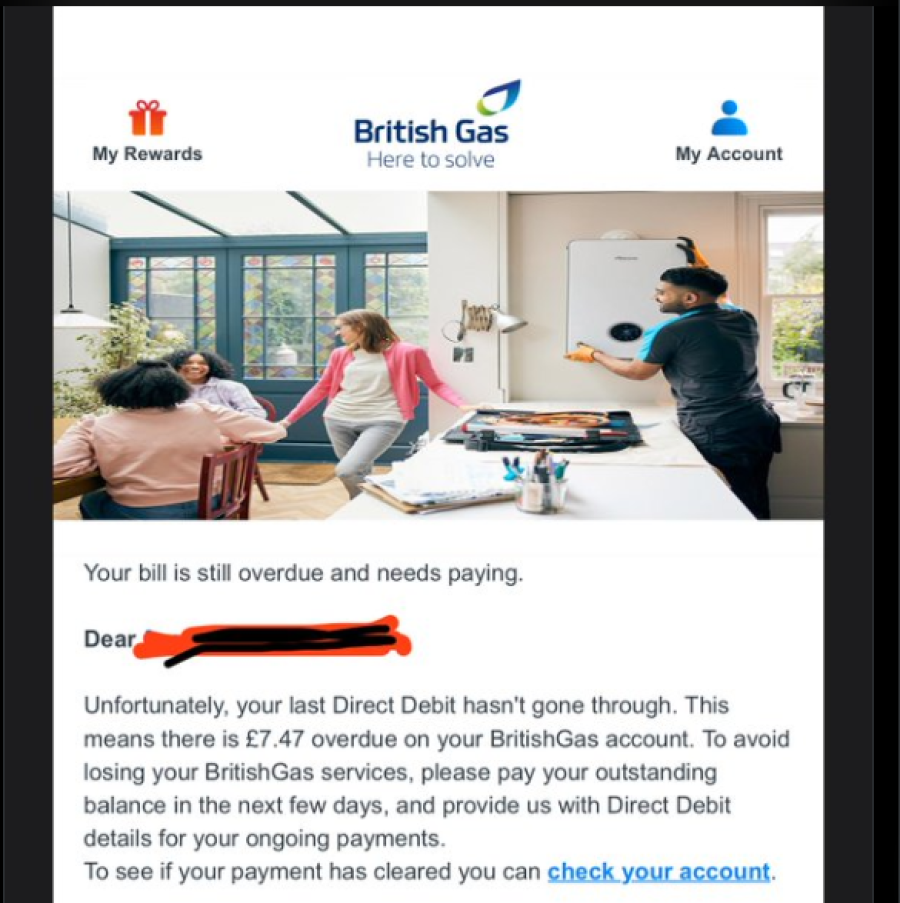
Clicking the link takes you to a convincing-looking site… that steals your login, personal, and financial data. No gas bill. Just hot trouble.
What’s Sketchy:
- Addressing you as “user@email.com”? Real classy.
- British Gas doesn’t send broken payment links out of the blue.
- The link? It’s about as legit as a fake ID on a high schooler.
Pro Tips:
- Don’t trust utility emails that address you by email only.
- Go directly to the company website if you’re unsure about a bill.
- If it smells phishy, it probably is.
Bottom Line: Scammers Want Your Trust. Don’t Give It Away for Free.
Today’s scams are smooth, emotional, and dressed like opportunity or authority. They want you to feel something — excited, scared, helpful — so you act without thinking.
But guess what? You’re smarter than that.
🔍 Before you click, pause.
🧠 Before you pay, verify.
📣 And if you got scammed, don’t stay silent — report it. It could stop someone else from falling for the same trick.
Stay One Step Ahead with ScamAdviser
Want to know if that job listing, gas bill, or generous billionaire is real?
Run a quick check on ScamAdviser.com — we verify websites, phone numbers, crypto wallets, and more.
On the move? The ScamAdviser App has your back 24/7. It’s fast, free, and always a few taps away from scam detection.
Because in the war against scams, knowledge isn’t just power — it’s protection.
Report a Scam!

Have you fallen for a hoax, bought a fake product? Report the site and warn others!
Scam Categories
Help & Info
Top Safety Picks
Your Go-To Tools for Online SafetyDisclaimer: Some of the links here are affiliate links. If you click them and make a purchase, we may earn a commission at no extra cost to you.
- ScamAdviser App - iOS : Your personal scam detector, on the go! Check website safety, report scams, and get instant alerts. Available on iOS
- ScamAdviser App - Android : Your personal scam detector, on the go! Check website safety, report scams, and get instant alerts. Available on Android.
- NordVPN : NordVPN keeps your connection private and secure whether you are at home, traveling, or streaming from another country. It protects your data, blocks unwanted ads and trackers, and helps you access your paid subscriptions anywhere. Try it Today!
- Incogni : Incogni automatically removes your personal data from data brokers that trade in personal information online, helping reduce scam and identity theft risks without the hassle of manual opt-outs. Reclaim your privacy now!
Popular Stories
In a nutshell: A good VPN protects your privacy with strong encryption, a strict no-logs policy, and fast protocols like WireGuard. The best VPNs also offer wide server coverage, leak protection, and easy-to-use apps for all devices. For 2025, the top providers are NordVPN, ExpressVPN, Surfshark, Proton VPN, Private Internet Access, CyberGhost, and Mullvad—each excelling in speed, security, or value. In an age where every click is tracked, a Virtual Private Network (VPN) is no longer just a luxury—it's an essential tool for digital privacy and security. A VPN works by creating a secure, encrypted tunnel between your device and the internet, masking your real IP address and protecting your sensitive data from prying eyes. But with hundreds of providers out there, how do you sort the secure from the suspect? This guide breaks down the non-negotiable features of a quality VPN and highlights the 7 top-rated services for 2025. What to Look for in a Good VPN: The 4 Non-Negotiable Pillars 1. Ironclad Security Features Strong Encryption: AES-256, the gold standard. Secure Protocols: OpenVPN, WireGuard, NordLynx, Lightway. Avoid PPTP. Kill Switch: Ensures no accidental IP leaks. Leak Protection: Covers DNS, IPv6, and WebRTC. 2. Verified Privacy Practices No-Logs Policy: No activity or metadata tracking. Independent Audits: Verification by third parties. Safe Jurisdiction: Prefer countries outside the 5/9/14 Eyes alliances. 3. High-Speed Performance Fast Protocols: WireGuard and equivalents. Large Server Network: Less crowding, more reliable speeds. 4. Essential Usability Features Multi-Device Apps: Windows, Mac, iOS, Android, routers. Simultaneous Connections: One account, many devices. Unblocking Power: Netflix, Hulu, BBC
How to Protect Yourself and Your Family After a Data Breach When Your Data Falls Into the Wrong Hands Just received that terrifying notification? Or perhaps you've noticed suspicious activity in your accounts? Take a deep breath. A data breach, the unauthorized access or exposure of sensitive, protected, or confidential data, is a deeply unsettling event. It can plunge you into a world of worry, bringing risks from financial losses and identity theft to significant emotional distress and reputational damage. The numbers don't lie: according to a 2024 report, the number of data breach victim notices has grown by a staggering 211% year-over-year. This isn't just a distant threat; it's a stark reality many individuals face. This year alone, we've seen major organizations like Adidas and Qantas grapple with high-profile data breaches, affecting countless customers. This underscores a critical truth: nobody is untouchable. Subsequently, strategic action is the only way to minimize the risk and protect your future. This guide is your emergency action plan, designed to walk you through every crucial step—from confirming the breach to fortifying your digital life for the long term. Part 1: Confirming the Breach and Understanding the Damage The very first step is to answer the question definitively: Was my data compromised, and if so, how badly? Start with the basics: Check Official NotificationsReputable companies are legally obligated to inform you if your data was part of a breach. Look for official emails, letters, or public announcements. Check Verified Breach DatabasesPlatforms like HaveIBeenPwned help you see if