
How to Recognize a Fake Job Offer
Author: Adam Collins
In a Nutshell
- Never pay for equipment, software, or "clearance fees" before starting a job.
- Verify every recruiter by contacting the company’s HR department through their official website.
- Treat any job offer that skips a face-to-face or video interview as a high-risk threat.
- Ignore "urgent" requests for your Social Security number or banking details during the initial chat.
The FBI’s Internet Crime Complaint Center (IC3) reported that victims lost over $501 million to employment-related scams in 2024, with losses continuing to climb in 2025 and 2026. Fraudsters are now using sophisticated AI to impersonate recruiters from household names like Amazon and Microsoft on platforms like LinkedIn and Telegram. You are likely here because a "dream opportunity" just landed in your inbox, but something feels off.
Spot the common traps
Scammers rely on the "work from home scam" to hide their lack of a physical office presence. They often use a "reshipping mule" scheme—a setup where you are paid to receive and forward stolen goods—to involve you in criminal activity. You might also encounter task-based scams where you are asked to "optimize data" by clicking buttons on a fake dashboard in exchange for crypto payments.
The most dangerous variant is the "pay-to-work" model. This involves the scammer sending you a fake check to buy home office equipment from their "approved vendor." When the bank eventually flags the check as fraudulent—often weeks later—the money is pulled from your account, but the money you sent to the vendor is gone forever.
Identify unsolicited offers
Legitimate recruiters rarely offer a job to someone they have never spoken to or who hasn't applied. This tactic works because it targets your desire for easy success and bypasses your natural skepticism. If an "Executive Recruiter" messages you out of the blue on WhatsApp or Signal, it is a major red flag.
Check your application history on LinkedIn or Indeed before replying. If you don't see a record of applying to that specific company, archive the message immediately. High-value roles always involve a multi-stage vetting process that starts with your intentional application.
Analyze vague job descriptions
Real job postings require specific skills and detailed responsibilities to filter out unqualified candidates. Scammers keep descriptions generic—using phrases like "administrative tasks" or "data entry"—to cast the widest possible net. This lack of detail allows them to pivot the "job" to whatever scam they are currently running.
Read the requirements closely for "must have a bank account" or "must be able to receive packages." If the description focuses more on how much you will earn than what you will actually do, you are looking at a fake job offer. A real role is defined by the work, not just the paycheck.
Question the "no interview" hire
Professional companies invest thousands of dollars in every new hire and will never commit without a video or in-person interview. Scammers avoid live video because it exposes their identity and location, which is often outside your home country. They prefer "text-only interviews" on platforms like Telegram or Skype to maintain their anonymity.
Insist on a video call using a corporate-linked platform like Microsoft Teams or Zoom. Look for the recruiter’s face and listen for inconsistencies in their story. If they claim their "camera is broken" or they are "in a secure facility," end the conversation immediately.
Verify the sender's email
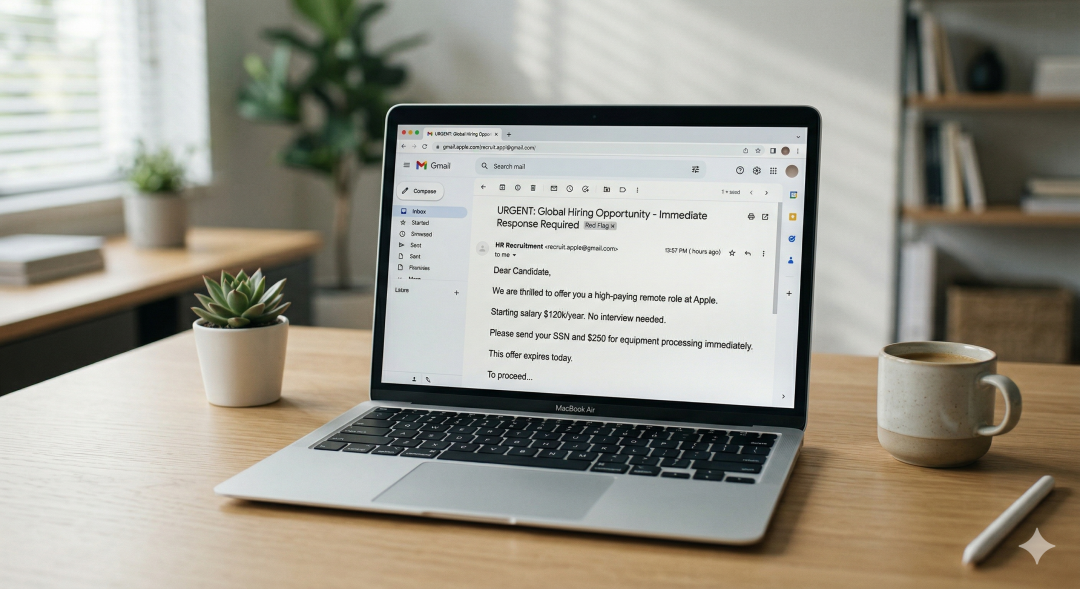
Corporate email systems are tied to private domains that scammers cannot legally access without hacking. They will instead use "generic company emails" like recruitment.amazon@gmail.com or amazon-hr-department.com. These look official at a glance but are actually cheap domains registered just days ago.
Hover your mouse over the "From" field to see the actual underlying email address. Compare the domain—the part after the @ symbol—to the official website of the company. If the company is Apple, the email must end in @apple.com, not @apple-jobs-portal.com.
Refuse all upfront payments
No legitimate employer will ever ask you to pay for your own background check, training materials, or "onboarding insurance." This is the core mechanic of the "pay-to-work" scam, where the fraudster extracts a small amount of money from thousands of victims. They use pressure phrases like "only today" to stop you from thinking clearly.
Tell the recruiter you will only pay for expenses that are reimbursed in your first paycheck. A real company will always cover these costs or provide the equipment directly to your door. If they insist on a "refundable deposit," you are being targeted by a thief.
Watch for "too-high" salaries
Market rates exist for a reason, and a "work from home scam" often promises $5,000 a week for simple data entry. These "guaranteed returns" are designed to trigger a dopamine response that clouds your judgment. If the pay is significantly higher than similar roles on Glassdoor or Payscale, the offer is fraudulent.
Research the average salary for the job title in your specific city. Scammers use inflated numbers to make you ignore other employment scam signs. Remember that if a job sounds like it pays too much for the effort required, it probably doesn't exist.
Verify with the source
Scammers can easily copy a CEO's photo and bio, but they cannot hide from a direct inquiry to the actual company. This is the most effective way to recognize a fake job offer because it bypasses the scammer's communication loop. You are taking control of the verification process.
Find the company’s official "Careers" page by typing their name directly into your browser. Search for the job ID provided in your offer letter. If the job isn't listed, call the main corporate switchboard and ask to speak with the HR representative named in your email.
What to do if targeted
Being targeted by a scammer is a sign that your data was likely leaked in a previous breach, not that you are gullible. If you have already shared your Social Security number, contact a credit bureau like Equifax or Experian to freeze your credit. If you sent money, contact your bank’s fraud department immediately to attempt a wire recall.
Report the scammer's profile directly to the platform where they contacted you, such as LinkedIn or Indeed. You should also file a report with the FTC at ReportFraud.ftc.gov or the FBI’s IC3 portal. Your report helps authorities track the digital infrastructure these criminals use to steal from others.
Frequently Asked Questions
Q: Can a recruiter ask for my credit card number to verify my identity?
A: No legitimate employer will ever ask for your credit card information as a method of identity verification.
Q: What should I do if a recruiter asks me to communicate only via WhatsApp?
A: Redirect the conversation to an official company email or platform, as legitimate corporate hiring rarely occurs exclusively on encrypted messaging apps.
Q: Is it safe to deposit a check from an employer to buy home office supplies?
A: No, this is a classic "fake check" scam where the bank eventually reverses the deposit and leaves you responsible for the lost funds.
Q: Why does the job offer look exactly like a real one from a major corporation?
A: Scammers use modern AI and stolen branding to mirror official documents, which is why you must verify the offer through the company’s official website.
Adam Collins is a cybersecurity researcher at ScamAdviser who operates under a pseudonym for privacy and security. With over four years on the digital frontlines and 1,500+ days spent deconstructing thousands of fraud schemes, he specialises in translating complex threats into actionable advice. His mission: exposing red flags so you can navigate the web with confidence.
Report a Scam!

Have you fallen for a hoax, bought a fake product? Report the site and warn others!
Scam Categories
Help & Info
Top Safety Picks
Your Go-To Tools for Online SafetyDisclaimer: Some of the links here are affiliate links. If you click them and make a purchase, we may earn a commission at no extra cost to you.
- ScamAdviser App - iOS : Your personal scam detector, on the go! Check website safety, report scams, and get instant alerts. Available on iOS
- ScamAdviser App - Android : Your personal scam detector, on the go! Check website safety, report scams, and get instant alerts. Available on Android.
- NordVPN : NordVPN keeps your connection private and secure whether you are at home, traveling, or streaming from another country. It protects your data, blocks unwanted ads and trackers, and helps you access your paid subscriptions anywhere. Try it Today!
- Incogni : Incogni automatically removes your personal data from data brokers that trade in personal information online, helping reduce scam and identity theft risks without the hassle of manual opt-outs. Reclaim your privacy now!
Popular Stories
In a nutshell: A good VPN protects your privacy with strong encryption, a strict no-logs policy, and fast protocols like WireGuard. The best VPNs also offer wide server coverage, leak protection, and easy-to-use apps for all devices. For 2025, the top providers are NordVPN, ExpressVPN, Surfshark, Proton VPN, Private Internet Access, CyberGhost, and Mullvad—each excelling in speed, security, or value. In an age where every click is tracked, a Virtual Private Network (VPN) is no longer just a luxury—it's an essential tool for digital privacy and security. A VPN works by creating a secure, encrypted tunnel between your device and the internet, masking your real IP address and protecting your sensitive data from prying eyes. But with hundreds of providers out there, how do you sort the secure from the suspect? This guide breaks down the non-negotiable features of a quality VPN and highlights the 7 top-rated services for 2025. What to Look for in a Good VPN: The 4 Non-Negotiable Pillars 1. Ironclad Security Features Strong Encryption: AES-256, the gold standard. Secure Protocols: OpenVPN, WireGuard, NordLynx, Lightway. Avoid PPTP. Kill Switch: Ensures no accidental IP leaks. Leak Protection: Covers DNS, IPv6, and WebRTC. 2. Verified Privacy Practices No-Logs Policy: No activity or metadata tracking. Independent Audits: Verification by third parties. Safe Jurisdiction: Prefer countries outside the 5/9/14 Eyes alliances. 3. High-Speed Performance Fast Protocols: WireGuard and equivalents. Large Server Network: Less crowding, more reliable speeds. 4. Essential Usability Features Multi-Device Apps: Windows, Mac, iOS, Android, routers. Simultaneous Connections: One account, many devices. Unblocking Power: Netflix, Hulu, BBC
How to Protect Yourself and Your Family After a Data Breach When Your Data Falls Into the Wrong Hands Just received that terrifying notification? Or perhaps you've noticed suspicious activity in your accounts? Take a deep breath. A data breach, the unauthorized access or exposure of sensitive, protected, or confidential data, is a deeply unsettling event. It can plunge you into a world of worry, bringing risks from financial losses and identity theft to significant emotional distress and reputational damage. The numbers don't lie: according to a 2024 report, the number of data breach victim notices has grown by a staggering 211% year-over-year. This isn't just a distant threat; it's a stark reality many individuals face. This year alone, we've seen major organizations like Adidas and Qantas grapple with high-profile data breaches, affecting countless customers. This underscores a critical truth: nobody is untouchable. Subsequently, strategic action is the only way to minimize the risk and protect your future. This guide is your emergency action plan, designed to walk you through every crucial step—from confirming the breach to fortifying your digital life for the long term. Part 1: Confirming the Breach and Understanding the Damage The very first step is to answer the question definitively: Was my data compromised, and if so, how badly? Start with the basics: Check Official NotificationsReputable companies are legally obligated to inform you if your data was part of a breach. Look for official emails, letters, or public announcements. Check Verified Breach DatabasesPlatforms like HaveIBeenPwned help you see if