
How to Recognize a Fake Parcel Delivery Scam
Author: Adam Collins
In a Nutshell
- Verify Independently: Manually enter tracking numbers on official courier websites.
- Identify Triggers: "Urgency" and "unpaid fees" are the primary psychological tactics used by criminals.
- Check the Sender: Look for "sender mismatches" where the email address or phone number does not align with the brand.
- Protect Financials: Never provide credit card details on a site reached via an unsolicited link.
Every year, government agencies like the FBI’s Internet Crime Complaint Center (IC3) record hundreds of thousands of complaints related to phishing and smishing. Whether it is a text from "USPS" claiming a warehouse hold or a "fake DHL SMS" regarding customs, these messages are timed to coincide with global shopping habits. One wrong click can expose your financial identity to sophisticated fraud networks.
How Does the Scam Work?
The delivery notification scam typically follows a three-step process: the bait, the hook, and the harvest.
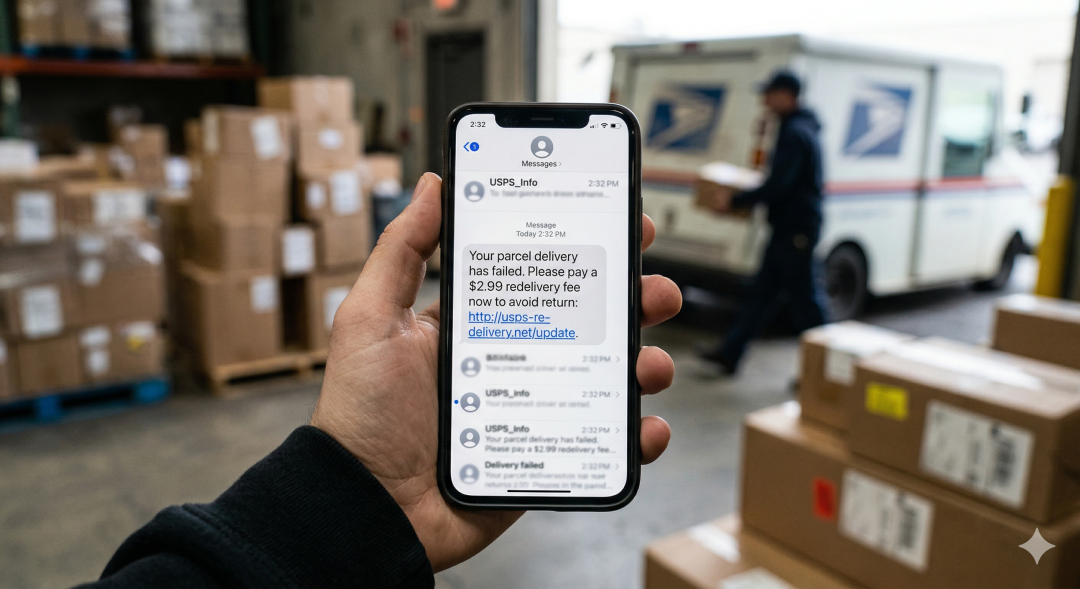
- The Bait: You receive a "smishing" (SMS phishing) message claiming a failed delivery or a small fee (often under $5).
- The Hook: A link directs you to a fraudulent portal designed to look identical to a legitimate courier.
- The Harvest: Once you enter your name and card details to pay a "redelivery fee," scammers steal your data for large-scale fraud.
Scammers use automated scripts to send millions of messages, knowing that even a tiny success rate yields massive profits. For more on how these domains are set up, you can check Scamadviser’s guide on identifying fake websites.
Which Couriers are Most Commonly Impersonated?
Scammers hide behind global giants like DHL, FedEx, UPS, and Royal Mail. In the United States, the "USPS phishing text" remains the most common threat. Criminals use high-definition templates to ensure their fake sites are indistinguishable from real ones. Treat every notification with skepticism—even if you are expecting a package.
Is the Message Unexpected? (Red Flag 1)
Real couriers do not send random texts to people who are not in their active tracking system. If you aren’t expecting a delivery, it is almost certainly a scam. Trust your memory of recent purchases over a random notification.
Does it Use a Generic Greeting? (Red Flag 2)
While some scams use leaked data to personalize messages, many still rely on "Dear Customer" or "Valued User." Authentic companies usually have your name on file. Furthermore, if a text asks you to "click to see details" without providing a valid tracking number upfront, it is a trap.
Is the URL Sketchy? (Red Flag 3)
The link is the most dangerous element. Scammers use URL shorteners or "look-alike domains" (e.g., fedex-parcel-update.net instead of fedex.com). Always hover over a link on a computer or long-press on mobile to see the actual destination.
Is There a Demand for Payment? (Red Flag 4)
Most legitimate services handle fees at the point of purchase. They will not hold a package hostage for a small "holding tax" via a text link. This small amount is a psychological trick to lower your guard; they are after your full credit card profile, not just a few dollars.
Is the Message Playing on Urgency? (Red Flag 5)
Phrases like "Action required within 4 hours" or "Final notice before return" are social engineering tactics. Real delivery delays rarely result in immediate package destruction. If a message makes you panic, it is designed to bypass your logic.
Are There Errors in Branding or Grammar? (Red Flag 6)
Many scams still feature pixelated logos or odd phrasing like "Your parcel is being holden." Professional corporations have rigorous quality control; a single typo is a major red flag that the message is fraudulent.
What is the Sender’s Number? (Red Flag 7)
Official alerts usually come from 5 or 6-digit short codes. If an alert comes from a standard 10-digit mobile number or an international country code you don't recognize, it is likely a burner phone or a spoofed number.
How Can You Verify a Real Delivery?
- Ignore the Link: Close the message immediately.
- Go to the Source: Manually type the official URL (e.g., ups.com) into your browser.
- Use the Official App: Use the courier's verified mobile app for secure, encrypted tracking.
What Should You Do If You Clicked?
- Freeze Your Accounts: Contact your bank immediately to report potential fraud and freeze your cards.
- Update Security: Change passwords for any accounts using the same credentials you may have entered.
- Scan for Malware: Run a comprehensive security scan on your device to check for hidden "keyloggers."
How Do You Report Smishing?
Forward suspicious texts to 7726 (a free service in many countries). You should also report the attempt to the Federal Trade Commission (FTC) or your local equivalent. Reporting helps authorities track and shut down the infrastructure scammers use.
Frequently Asked Questions (FAQ)
Q: Can I get a virus just by opening the text message?
A: Simply opening the SMS is generally low risk. The danger lies in clicking the link, providing information, or downloading any "tracking app" attachments.
Q: I’m expecting a package and got a text. How can I be sure?
A: Never use the link in the text. Copy the tracking number and paste it directly into the search bar of the official website. If the number doesn't work there, the text is a scam.
Q: Does a "https://" at the start of a link mean it's safe?
A: No. Almost all phishing sites now use HTTPS to show the "padlock" icon. It only means the connection is encrypted, not that the site is legitimate.
Q: Why do scammers ask for such a small fee?
A: A $1.00 or $2.00 fee feels low-risk to the victim. However, once you enter your card details, the scammer uses them for much larger, unauthorized purchases.
Adam Collins is a cybersecurity researcher at ScamAdviser who operates under a pseudonym for privacy and security. With over four years on the digital frontlines and 1,500+ days spent deconstructing thousands of fraud schemes, he specialises in translating complex threats into actionable advice. His mission: exposing red flags so you can navigate the web with confidence.
Report a Scam!

Have you fallen for a hoax, bought a fake product? Report the site and warn others!
Scam Categories
Help & Info
Top Safety Picks
Your Go-To Tools for Online SafetyDisclaimer: Some of the links here are affiliate links. If you click them and make a purchase, we may earn a commission at no extra cost to you.
- ScamAdviser App - iOS : Your personal scam detector, on the go! Check website safety, report scams, and get instant alerts. Available on iOS
- ScamAdviser App - Android : Your personal scam detector, on the go! Check website safety, report scams, and get instant alerts. Available on Android.
- NordVPN : NordVPN keeps your connection private and secure whether you are at home, traveling, or streaming from another country. It protects your data, blocks unwanted ads and trackers, and helps you access your paid subscriptions anywhere. Try it Today!
- Incogni : Incogni automatically removes your personal data from data brokers that trade in personal information online, helping reduce scam and identity theft risks without the hassle of manual opt-outs. Reclaim your privacy now!
Popular Stories
In a nutshell: A good VPN protects your privacy with strong encryption, a strict no-logs policy, and fast protocols like WireGuard. The best VPNs also offer wide server coverage, leak protection, and easy-to-use apps for all devices. For 2025, the top providers are NordVPN, ExpressVPN, Surfshark, Proton VPN, Private Internet Access, CyberGhost, and Mullvad—each excelling in speed, security, or value. In an age where every click is tracked, a Virtual Private Network (VPN) is no longer just a luxury—it's an essential tool for digital privacy and security. A VPN works by creating a secure, encrypted tunnel between your device and the internet, masking your real IP address and protecting your sensitive data from prying eyes. But with hundreds of providers out there, how do you sort the secure from the suspect? This guide breaks down the non-negotiable features of a quality VPN and highlights the 7 top-rated services for 2025. What to Look for in a Good VPN: The 4 Non-Negotiable Pillars 1. Ironclad Security Features Strong Encryption: AES-256, the gold standard. Secure Protocols: OpenVPN, WireGuard, NordLynx, Lightway. Avoid PPTP. Kill Switch: Ensures no accidental IP leaks. Leak Protection: Covers DNS, IPv6, and WebRTC. 2. Verified Privacy Practices No-Logs Policy: No activity or metadata tracking. Independent Audits: Verification by third parties. Safe Jurisdiction: Prefer countries outside the 5/9/14 Eyes alliances. 3. High-Speed Performance Fast Protocols: WireGuard and equivalents. Large Server Network: Less crowding, more reliable speeds. 4. Essential Usability Features Multi-Device Apps: Windows, Mac, iOS, Android, routers. Simultaneous Connections: One account, many devices. Unblocking Power: Netflix, Hulu, BBC
How to Protect Yourself and Your Family After a Data Breach When Your Data Falls Into the Wrong Hands Just received that terrifying notification? Or perhaps you've noticed suspicious activity in your accounts? Take a deep breath. A data breach, the unauthorized access or exposure of sensitive, protected, or confidential data, is a deeply unsettling event. It can plunge you into a world of worry, bringing risks from financial losses and identity theft to significant emotional distress and reputational damage. The numbers don't lie: according to a 2024 report, the number of data breach victim notices has grown by a staggering 211% year-over-year. This isn't just a distant threat; it's a stark reality many individuals face. This year alone, we've seen major organizations like Adidas and Qantas grapple with high-profile data breaches, affecting countless customers. This underscores a critical truth: nobody is untouchable. Subsequently, strategic action is the only way to minimize the risk and protect your future. This guide is your emergency action plan, designed to walk you through every crucial step—from confirming the breach to fortifying your digital life for the long term. Part 1: Confirming the Breach and Understanding the Damage The very first step is to answer the question definitively: Was my data compromised, and if so, how badly? Start with the basics: Check Official NotificationsReputable companies are legally obligated to inform you if your data was part of a breach. Look for official emails, letters, or public announcements. Check Verified Breach DatabasesPlatforms like HaveIBeenPwned help you see if