
Real Social Engineering Attack Examples and How to Spot Them

Author: Adam Collins
In a Nutshell
- Social engineering exploits human psychology rather than software bugs to steal data or money.
- Business Email Compromise (BEC) remains the most expensive threat, costing billions annually through impersonation.
- New deepfake technology allows scammers to mimic voices and faces of loved ones or executives in real-time.
- Always verify "urgent" requests through a second, independent communication channel before acting.
The FBI’s Internet Crime Complaint Center (IC3) reported that business email compromise (BEC) alone cost organizations and individuals over $2.7 billion in 2024. In the same period, high-profile social engineering attacks against major hospitality and tech firms resulted in hundreds of millions in lost revenue after scammers used simple phone calls to trick IT help desks into handing over administrative credentials. You are no longer just dodging generic spam; you are the target of precision-engineered psychological traps designed to make you click before you think.
Spot the phishing hook
Phishing — the practice of sending fraudulent communications that appear to come from a reputable source — works because it creates a false sense of urgency or fear. Scammers use pressure phrases like "account suspended" or "unauthorized login detected" to bypass your logical thinking and trigger a panicked response. For instance, there is this email, from impersonating Microsoft saying your account will close due to "inactivity."
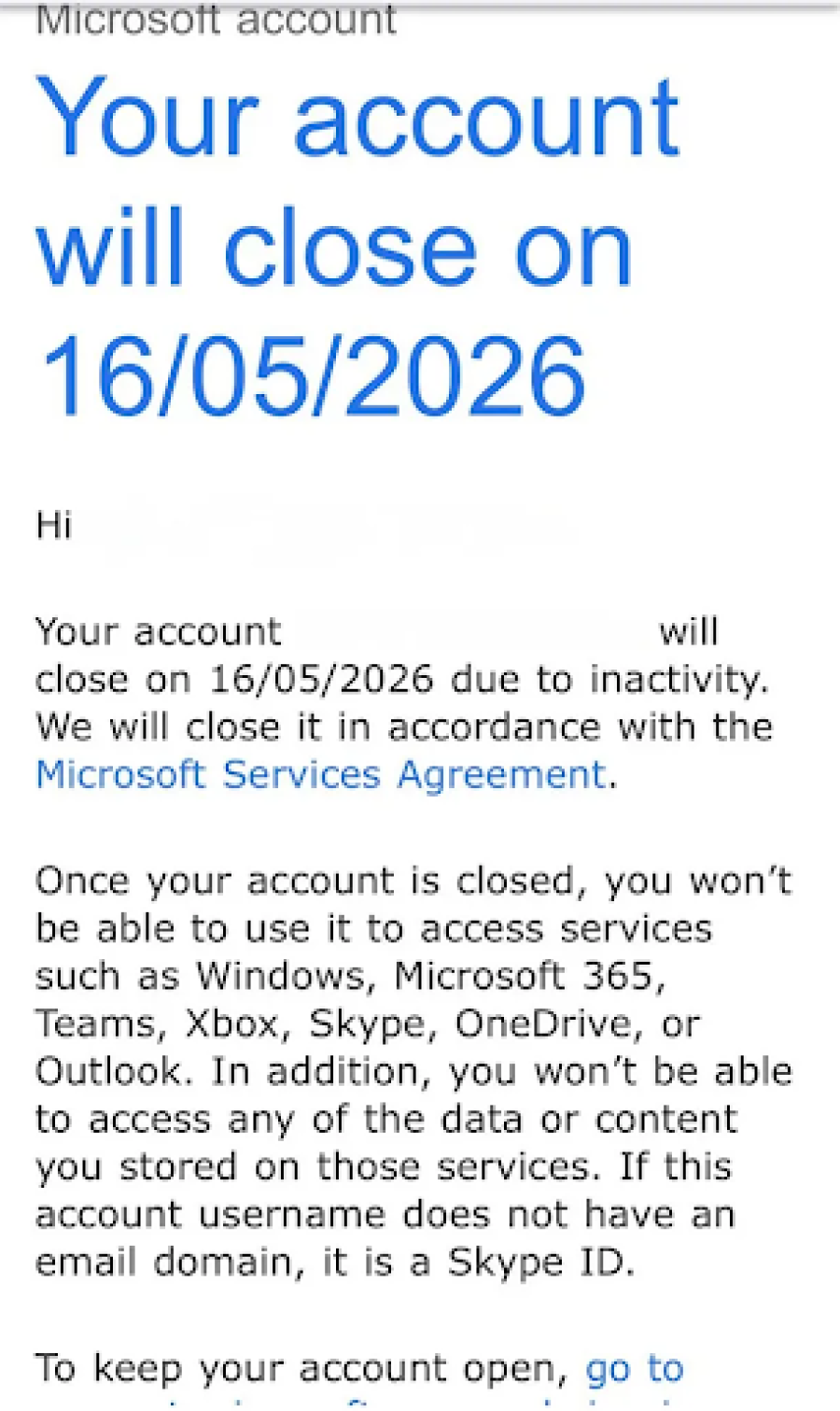
You should never click a link in an email to "verify your identity" or "update payment details" if the message was unsolicited.
Check the sender’s actual email address by hovering your mouse over the name to see if it matches the official domain of the company. A legitimate message from PayPal will never come from a Gmail or Outlook address containing random strings of numbers.
Verify the boss
Business Email Compromise (BEC) is a sophisticated form of social engineering where a criminal impersonates a high-level executive or a trusted vendor. The mechanic relies on your natural desire to be helpful or your fear of questioning authority when "the CEO" asks for a "quick favor." The scammer might tell you to "keep this confidential" or state they are in a meeting and can only communicate via email or text.
If you receive a request to change wire transfer instructions or purchase gift cards for a corporate event, stop immediately. Call the person directly using a number you already have saved in your contacts to confirm the request is real. Most financial departments in 2026 now require a "two-man rule" — a policy where two separate people must authorize any significant outgoing payment — to prevent these losses.
Question the deepfake
Deepfake scams — which use artificial intelligence to clone a person’s voice or likeness — have turned "vishing" (voice phishing) into a terrifyingly effective tool. A scammer only needs a 30-second clip of your voice from social media to create a clone that can call your family claiming you are in "legal trouble" or have been in an "accident." They count on the emotional shock to prevent you from noticing slight robotic cadences or unnatural pauses in the conversation.
Establish a "safe word" or a secret question with your family members that only you would know. If you receive a suspicious call from a loved one in distress, hang up and call them back on their personal line. You can also ask the caller a specific question about a shared memory that an AI or a stranger could never find online.
Avoid the bait
Baiting involves a scammer leaving a physical or digital lure, such as a "free software download" or a USB drive labeled "Executive Salaries," for a victim to find. This exploits human curiosity or greed, leading you to compromise your own security by installing malware — malicious software designed to damage or gain unauthorized access to a computer. Once the file is opened, the attacker gains a "backdoor" into your system, allowing them to record your keystrokes or steal your passwords.
Never plug a random USB drive into your computer, even if you find it in a public place or your office lobby. When downloading software, only use official app stores or the developer's verified website. If a deal for "free premium access" or "guaranteed returns" seems too good to be true, it is almost certainly a trap.
Stop the physical slip-up
Tailgating — also known as piggybacking — occurs when an unauthorized person follows an employee into a restricted area by literally walking in behind them. The attacker might hold a stack of boxes or a tray of coffees to look busy, counting on your politeness to "hold the door" for them. This allows them physical access to server rooms or unlocked workstations where they can steal hardware or plant tracking devices.
Always use your own badge to enter secure areas and do not feel rude for letting a door close behind you. If someone you don't recognize tries to enter with you, kindly direct them to the main reception desk for check-in. Real security starts with the physical habits you maintain every time you walk through a door.
Bottom Line: Trust is Sacred
Staying safe from social engineering requires you to embrace a mindset of "trust but verify." Scammers are experts at manipulating human kindness, but they cannot defeat a person who pauses to check the facts. If you encounter a scam, report it immediately to the platform involved and your national authority, such as the FBI’s IC3 in the United States or Action Fraud in the UK. Your skepticism is the strongest firewall you have against modern deception.
FAQs
1. What is social engineering in cybersecurity?
Social engineering is a manipulation technique that exploits human psychology, rather than technical hacking, to trick people into revealing confidential information or taking insecure actions.
2. What is the difference between phishing and business email compromise (BEC)?
Phishing is the general practice of sending broad, fraudulent emails to massive audiences, while BEC is a targeted form of social engineering where a criminal specifically impersonates a high-level executive or trusted vendor.
3. How does deepfake technology change the risk of social engineering attacks?
New deepfake technology allows scammers to generate convincing AI-clones of an individual's voice or face in real-time, making "vishing" (voice phishing) calls and video impersonations highly sophisticated and difficult to detect.
4. What immediate steps should I take if I detect or fall victim to a social engineering attack?
Immediately secure your affected accounts, report the incident to your IT department or organization's security team, and file a formal report with a national authority, such as the FBI’s Internet Crime Complaint Center (IC3).
Adam Collins is a cybersecurity researcher at ScamAdviser who operates under a pseudonym for privacy and security. With over four years on the digital frontlines and 1,500+ days spent deconstructing thousands of fraud schemes, he specializes in translating complex threats into actionable advice. Adam’s mission is simple: exposing red flags so you can navigate the web with confidence.
Report a Scam!

Have you fallen for a hoax, bought a fake product? Report the site and warn others!
Scam Categories
Help & Info
Top Safety Picks
Your Go-To Tools for Online SafetyDisclaimer: Some of the links here are affiliate links. If you click them and make a purchase, we may earn a commission at no extra cost to you.
- ScamAdviser App - iOS : Your personal scam detector, on the go! Check website safety, report scams, and get instant alerts. Available on iOS
- ScamAdviser App - Android : Your personal scam detector, on the go! Check website safety, report scams, and get instant alerts. Available on Android.
- NordVPN : NordVPN keeps your connection private and secure whether you are at home, traveling, or streaming from another country. It protects your data, blocks unwanted ads and trackers, and helps you access your paid subscriptions anywhere. Try it Today!
- Incogni : Incogni automatically removes your personal data from data brokers that trade in personal information online, helping reduce scam and identity theft risks without the hassle of manual opt-outs. Reclaim your privacy now!
Popular Stories
In a nutshell: A good VPN protects your privacy with strong encryption, a strict no-logs policy, and fast protocols like WireGuard. The best VPNs also offer wide server coverage, leak protection, and easy-to-use apps for all devices. For 2025, the top providers are NordVPN, ExpressVPN, Surfshark, Proton VPN, Private Internet Access, CyberGhost, and Mullvad—each excelling in speed, security, or value. In an age where every click is tracked, a Virtual Private Network (VPN) is no longer just a luxury—it's an essential tool for digital privacy and security. A VPN works by creating a secure, encrypted tunnel between your device and the internet, masking your real IP address and protecting your sensitive data from prying eyes. But with hundreds of providers out there, how do you sort the secure from the suspect? This guide breaks down the non-negotiable features of a quality VPN and highlights the 7 top-rated services for 2025. What to Look for in a Good VPN: The 4 Non-Negotiable Pillars 1. Ironclad Security Features Strong Encryption: AES-256, the gold standard. Secure Protocols: OpenVPN, WireGuard, NordLynx, Lightway. Avoid PPTP. Kill Switch: Ensures no accidental IP leaks. Leak Protection: Covers DNS, IPv6, and WebRTC. 2. Verified Privacy Practices No-Logs Policy: No activity or metadata tracking. Independent Audits: Verification by third parties. Safe Jurisdiction: Prefer countries outside the 5/9/14 Eyes alliances. 3. High-Speed Performance Fast Protocols: WireGuard and equivalents. Large Server Network: Less crowding, more reliable speeds. 4. Essential Usability Features Multi-Device Apps: Windows, Mac, iOS, Android, routers. Simultaneous Connections: One account, many devices. Unblocking Power: Netflix, Hulu, BBC
How to Protect Yourself and Your Family After a Data Breach When Your Data Falls Into the Wrong Hands Just received that terrifying notification? Or perhaps you've noticed suspicious activity in your accounts? Take a deep breath. A data breach, the unauthorized access or exposure of sensitive, protected, or confidential data, is a deeply unsettling event. It can plunge you into a world of worry, bringing risks from financial losses and identity theft to significant emotional distress and reputational damage. The numbers don't lie: according to a 2024 report, the number of data breach victim notices has grown by a staggering 211% year-over-year. This isn't just a distant threat; it's a stark reality many individuals face. This year alone, we've seen major organizations like Adidas and Qantas grapple with high-profile data breaches, affecting countless customers. This underscores a critical truth: nobody is untouchable. Subsequently, strategic action is the only way to minimize the risk and protect your future. This guide is your emergency action plan, designed to walk you through every crucial step—from confirming the breach to fortifying your digital life for the long term. Part 1: Confirming the Breach and Understanding the Damage The very first step is to answer the question definitively: Was my data compromised, and if so, how badly? Start with the basics: Check Official NotificationsReputable companies are legally obligated to inform you if your data was part of a breach. Look for official emails, letters, or public announcements. Check Verified Breach DatabasesPlatforms like HaveIBeenPwned help you see if