
Top Scams: Qantas Data Leak, Fake Barclays Email, and Jewelry Site Warning
Author: Adam Collins
Scammers are no longer hiding behind broken English and shady pop-ups. Today’s cons are clean, professional, and sometimes even poetic. They name-drop banks, sound like airlines, and offer handcrafted jewelry so perfect it practically glows. Their secret weapon? Emotion — fear, urgency, excitement. And once they’ve hooked your feelings, they go for your details.
This week, we’re unpacking four trending scams that are smooth, sharp, and sadly effective. From cyber incidents at Qantas to a suspiciously charming jewelry store that seems too polished to be real, here’s what to know and how to stay safe.
Qantas Data Breach: The “Surprise, We Lost Your Number Too” Incident
The Setup:
Qantas customers received a follow-up email this week with an ominous subject line: “Additional data type identified.” Translation? Your phone number was also in the data breach during the June 30 cyber incident. If you’re a Qantas Frequent Flyer, your personal info might now be floating around in scammers' inboxes.
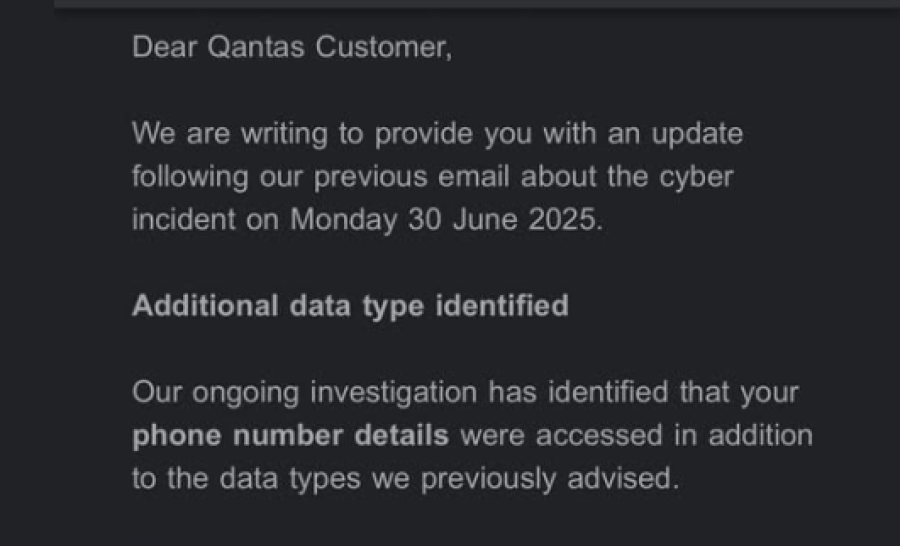
Source: Facebook
The message urges customers to stay alert for phone-based scams, not just phishing emails or dodgy texts. In short, scam calls might be coming to a number you thought was safe.
What’s Sketchy:
- This is real — and that’s what makes it so dangerous.
- Scammers love piggybacking on real breaches to launch fake follow-ups.
- Now that your number is exposed, expect more cold calls pretending to be Qantas, your bank, or someone pretending to “help.”
Pro Tips:
- Be wary of unexpected calls claiming to be from Qantas or any authority.
- Never give out personal or payment details over the phone unless you initiated the call
- Bookmark official support pages — if you’re unsure, hang up and contact the company directly.
- Use ScamAdviser.com to check suspicious domains or phone numbers.
Barclays Biometric Scam: When the Link Isn’t as Smart as Your Face ID
The Setup:
You receive an email from Barclays, complete with your name in the greeting and a very official tone. The message says that, due to new FCA requirements, all customers must activate biometric login — fingerprint or face scan — immediately. There’s even a tidy little button that says “Get Started.”
It feels modern. Secure. Mandatory. But it’s none of the above.
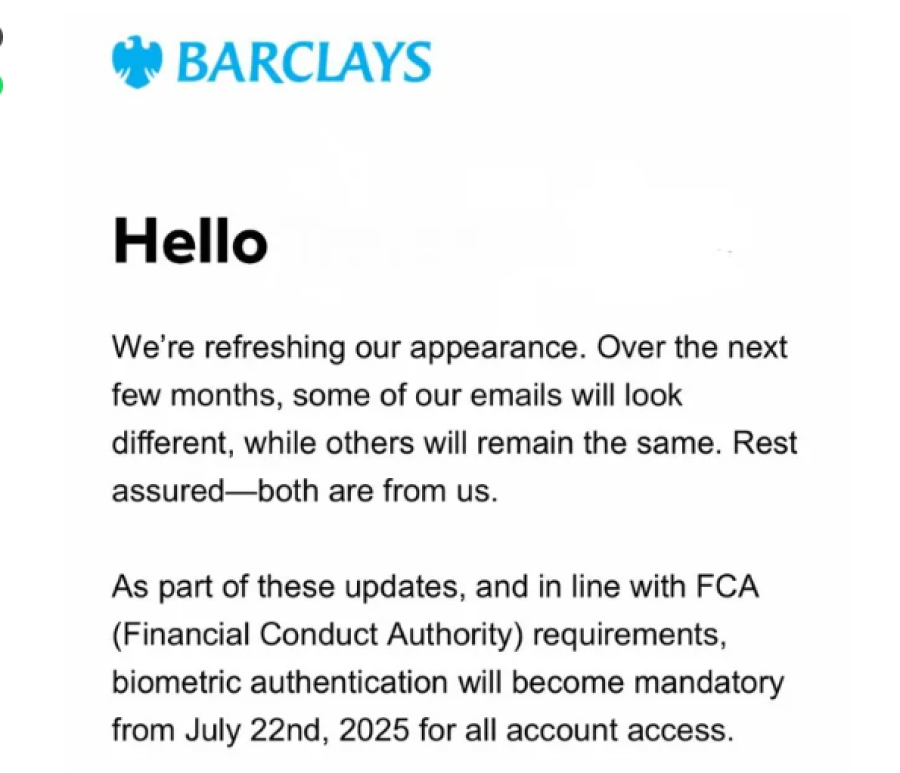
What’s Sketchy:
- The FCA has no such requirement.
- Barclays isn't asking customers to sign up for biometric ID by email.
- The link goes to a phishing site — a convincing fake — where your login credentials and bank details are up for grabs.
Pro Tips:
- Don’t click links in emails asking you to “activate” anything urgently.
- Visit your bank’s website directly or call customer service.
- Biometric features are usually set up in your banking app, not through random emails.
- Look out for slightly misspelled URLs or strange email sender addresses.
“I’m Wendy Clarke”: The Jewelry Store That’s Almost Too Pretty to Be True
The Setup:
You’re scrolling social media when you stumble upon a stunning ad: minimalist, handmade, ethical jewelry crafted in Edinburgh by a woman named Wendy Clarke. The website looks dreamy. The copy reads, “Each design tells a story — maybe even yours.” Prices are surprisingly affordable. It feels personal, poetic... and just a little suspicious.

What’s Sketchy:
- The store has little-to-no customer reviews outside of its own site.
- Domain history is new or linked to scam complaints.
- Some buyers report paying but never receiving their orders, or receiving poor-quality, mass-produced knockoffs.
Pro Tips:
- Run the website through ScamAdviser.com before you buy.
- Check for an “About” page with verifiable details (address, real business registration, contact info).
- Google the brand + “scam” or “review” to see what others are saying.
- If it looks like Etsy but costs like Temu, dig deeper before you click Add to Cart.
Bonus Scam Alert: “Delivery Attempt Failed” Texts Are Back
The Setup:
You get a text saying your package couldn’t be delivered due to an address issue. There’s a link to “reschedule” or pay a small redelivery fee.
What’s Sketchy:
- You weren’t expecting a delivery.
- The tracking number is generic or nonexistent.
- The link asks for payment information and personal data.
Pro Tips:
- Check with your delivery provider directly — never click links in unsolicited texts.
- Scammers often spoof legitimate courier names like DHL, Australia Post, or FedEx.
- Use your tracking app or account to verify deliveries.
Bottom Line: Scammers Are After Your Trust, Not Just Your Info
Whether it’s an airline admitting a breach, a bank being impersonated, or a heartfelt jewelry site with suspicious sparkle, scams these days don’t always look shady. They’re crafted to feel real. To feel safe. And that’s exactly what makes them dangerous.
So here’s your survival rule:
🔍 Pause before you click.
🧠 Verify before you act.
📣 Report what’s suspicious — you might save someone else.
If you’re ever unsure, run a quick check at ScamAdviser.com or download the ScamAdviser App. It’s fast, free, and can flag dodgy sites, phone numbers, and wallets before you fall into the trap.
Because in a world full of digital danger dressed as opportunity, a little skepticism is your superpower.
Report a Scam!

Have you fallen for a hoax, bought a fake product? Report the site and warn others!
Scam Categories
Help & Info
Top Safety Picks
Your Go-To Tools for Online SafetyDisclaimer: Some of the links here are affiliate links. If you click them and make a purchase, we may earn a commission at no extra cost to you.
- ScamAdviser App - iOS : Your personal scam detector, on the go! Check website safety, report scams, and get instant alerts. Available on iOS
- ScamAdviser App - Android : Your personal scam detector, on the go! Check website safety, report scams, and get instant alerts. Available on Android.
- NordVPN : NordVPN keeps your connection private and secure whether you are at home, traveling, or streaming from another country. It protects your data, blocks unwanted ads and trackers, and helps you access your paid subscriptions anywhere. Try it Today!
- Incogni : Incogni automatically removes your personal data from data brokers that trade in personal information online, helping reduce scam and identity theft risks without the hassle of manual opt-outs. Reclaim your privacy now!
Popular Stories
In a nutshell: A good VPN protects your privacy with strong encryption, a strict no-logs policy, and fast protocols like WireGuard. The best VPNs also offer wide server coverage, leak protection, and easy-to-use apps for all devices. For 2025, the top providers are NordVPN, ExpressVPN, Surfshark, Proton VPN, Private Internet Access, CyberGhost, and Mullvad—each excelling in speed, security, or value. In an age where every click is tracked, a Virtual Private Network (VPN) is no longer just a luxury—it's an essential tool for digital privacy and security. A VPN works by creating a secure, encrypted tunnel between your device and the internet, masking your real IP address and protecting your sensitive data from prying eyes. But with hundreds of providers out there, how do you sort the secure from the suspect? This guide breaks down the non-negotiable features of a quality VPN and highlights the 7 top-rated services for 2025. What to Look for in a Good VPN: The 4 Non-Negotiable Pillars 1. Ironclad Security Features Strong Encryption: AES-256, the gold standard. Secure Protocols: OpenVPN, WireGuard, NordLynx, Lightway. Avoid PPTP. Kill Switch: Ensures no accidental IP leaks. Leak Protection: Covers DNS, IPv6, and WebRTC. 2. Verified Privacy Practices No-Logs Policy: No activity or metadata tracking. Independent Audits: Verification by third parties. Safe Jurisdiction: Prefer countries outside the 5/9/14 Eyes alliances. 3. High-Speed Performance Fast Protocols: WireGuard and equivalents. Large Server Network: Less crowding, more reliable speeds. 4. Essential Usability Features Multi-Device Apps: Windows, Mac, iOS, Android, routers. Simultaneous Connections: One account, many devices. Unblocking Power: Netflix, Hulu, BBC
How to Protect Yourself and Your Family After a Data Breach When Your Data Falls Into the Wrong Hands Just received that terrifying notification? Or perhaps you've noticed suspicious activity in your accounts? Take a deep breath. A data breach, the unauthorized access or exposure of sensitive, protected, or confidential data, is a deeply unsettling event. It can plunge you into a world of worry, bringing risks from financial losses and identity theft to significant emotional distress and reputational damage. The numbers don't lie: according to a 2024 report, the number of data breach victim notices has grown by a staggering 211% year-over-year. This isn't just a distant threat; it's a stark reality many individuals face. This year alone, we've seen major organizations like Adidas and Qantas grapple with high-profile data breaches, affecting countless customers. This underscores a critical truth: nobody is untouchable. Subsequently, strategic action is the only way to minimize the risk and protect your future. This guide is your emergency action plan, designed to walk you through every crucial step—from confirming the breach to fortifying your digital life for the long term. Part 1: Confirming the Breach and Understanding the Damage The very first step is to answer the question definitively: Was my data compromised, and if so, how badly? Start with the basics: Check Official NotificationsReputable companies are legally obligated to inform you if your data was part of a breach. Look for official emails, letters, or public announcements. Check Verified Breach DatabasesPlatforms like HaveIBeenPwned help you see if